Direct answer
Receive wholesale phones in separate, recorded steps per IMEI: count and scan units against the manifest, check liquid damage indicators, run IMEI blacklist checks, confirm Activation Lock or Factory Reset Protection on the powered device, then run diagnostics and grade cosmetics under fixed lighting. What diagnostic software can read depends on the vendor, model and OS version.
Key takeaways
- Count and scan every carton on arrival and note damage on the delivery receipt before signing.
- IMEI blacklist checks can run from the manifest; Activation Lock and FRP are confirmed on the powered device.
- Check liquid damage indicators before connecting devices to charging power.
- Record a pass, fail or pending result per IMEI for every step, so supplier claims rest on evidence.
In high-volume mobile trade, the receiving line decides whether a supplier claim can be proved. Crates of pre-owned phones processed with loose manual checklists leave gaps: units counted but not scanned, locks found after the claim window, and grades nobody can trace back to a test.
A wholesale phone intake diagnostic process that keeps physical receiving, lock status, functional testing and cosmetic grading as separate, recorded steps lets a distributor match the delivery to the manifest and raise discrepancies with evidence. For the count at the dock, see our palletized shipment unboxing and tally protocols.
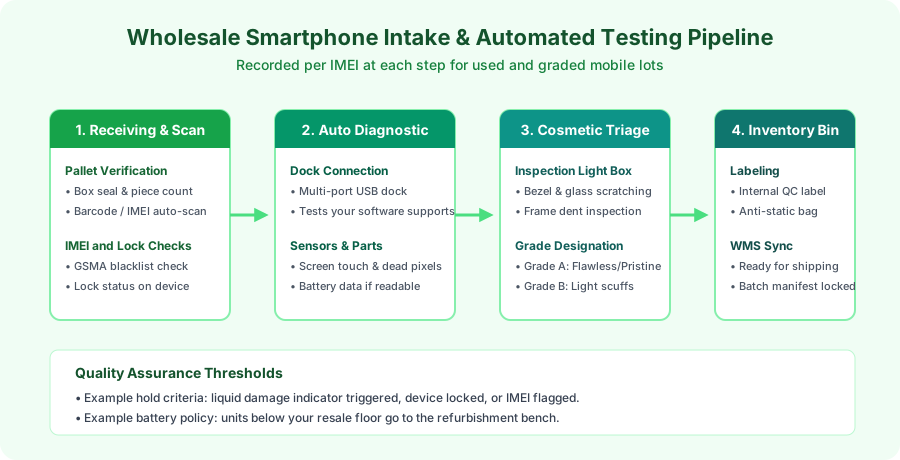
| Step | What is checked | Record per IMEI |
|---|---|---|
| 1. Dock receiving | Seals, carton count, damage, units scanned against the ASN or manifest; liquid damage indicators checked before any unit is charged | Received / missing / extra / damaged in transit / LDI triggered |
| 2. IMEI checks | Blacklist status from an IMEI service; any other status fields your service documents for that carrier and country | Clear / flagged / not covered |
| 3. Lock status | Activation Lock or Factory Reset Protection, shown on the powered device | Unlocked / locked / pending |
| 4. Functional test | The test list your software supports for that model | Pass / fail (which test) / not supported |
| 5. Cosmetic grade | Housing, cover glass, ports, liquid damage indicator under fixed lighting | Grade and defect notes |
1. Dock Receiving: Manifest Reconciliation & Security Scrutiny
The intake protocol begins when the freight reaches the receiving dock:
- Outer Seal & Tamper Inspection: Inspect shrink wrap, security tape and carton strapping. Note punctures or crushed corners on the carrier’s delivery receipt or Bill of Lading (BOL) before signing.
- Barcode & Serial Ingestion: Open each master carton and scan units into the warehouse management system (WMS), matching serials and IMEIs against the seller’s advance shipping notice (ASN) or manifest.
- Liquid damage first look: Check the visible liquid damage indicators before any unit is connected to power, and set aside units with a triggered indicator. The full port and LDI inspection is repeated at cosmetic grading.
- IMEI-Based Checks: Because these use only the IMEI, they can run from the manifest before devices are powered:
- Blacklist status: An IMEI blacklist service, such as GSMA Device Check, flags devices reported lost, stolen or blocked by participating operators.
- Other status fields: Carrier lock and unpaid-balance status are separate questions. Ask your IMEI service, in writing, which fields it returns for which carriers and countries, and record “not covered” rather than “clear” where it has no data.
Any handset that fails these checks is quarantined and documented for the supplier dispute. For what a lot listing should state before you buy, see how to read a wholesale phone lot.
Lock status is confirmed on the device
Activation Lock and Factory Reset Protection are account locks, not blacklist entries. Apple states that an iPhone contacts Apple to check whether Activation Lock is on each time it is activated or recovered, and Google’s Factory Reset Protection asks for the previous Google Account or screen lock after an unauthorised reset. Some third-party services offer lock-status lookups by IMEI or serial number before the phone is powered on; what they can see depends on the data their vendor has access to, so treat a lookup result as a lead to confirm, not as proof of the lock state. Confirm these on the powered device, for example at the setup screen, and record the result per IMEI. If you use diagnostic software to read lock status, use it only for the models and OS versions its vendor documents as supported, and record “pending” rather than “unlocked” when it returns no result.
2. Multi-Port Automated Hardware Testing
The core of the automated mobile testing workflow is running the same test sequence on every handset. Units are connected to multi-port USB stations running the diagnostic suite you license. How many devices one station tests at once, and how long a cycle takes, depends on the software, the hardware and the test list; take those figures from your vendor’s documentation or your own timed runs.
Before you rely on a suite, check its documentation against this list:
- Sensor and radio tests: Which of Wi-Fi, Bluetooth, cellular, ambient light, proximity, accelerometer and NFC it tests on each model and OS version, and whether each test is automatic or needs an operator.
- Display and touch: Whether it shows solid colour fields and a touch grid, and who judges the result: the software or the technician looking for dead pixels, burn-in and dead zones.
- Replaced parts: Part checks depend on the platform. On iPhone, Apple’s Parts and Service History (iOS 15.2 and later) labels replaced parts as Genuine, Unknown, Unverified or Used, and which parts are covered depends on the model. On Android, part information varies by manufacturer.
- Battery data: What can be read also depends on the model. Record what your software reports, such as maximum capacity or cycle count, and mark the field “not available” when the device does not expose it.
3. Optical Cosmetic Grading & Lightbox Triage
Cosmetic grading needs controlled, repeatable inspection. Use the same lighting, viewing distance and defect definitions at every station, and write them into your grading sheet; see how graded used phones are described.
| Warehouse Inspection Station | Lighting | Inspection Target | Acceptance Standard |
|---|---|---|---|
| Bezel & Housing Inspection | Fixed, neutral light; record the colour temperature and level you use | Edge drops, corner scuffs, finish wear | Defect size and count as defined in your grading sheet |
| Cover Glass Lightbox | Angled light | Micro-scratches, coating wear | No cracks; scratch limits per your grading sheet |
| Port & LDI Check | Magnifier | USB-C pins, microphone grilles, liquid damage indicators | Clean pins; LDI not triggered |
Technicians sort verified handsets into colour-coded antistatic totes:
- Green Tote (Ready for Resale): Units that passed every step for their grade, packed into protective sleeves and racked.
- Yellow Tote (Refurbishment Candidate): Handsets with working boards but a battery below your resale floor or minor back-glass damage, routed to the technician bench.
- Red Tote (Supplier RMA / Quarantine): Board faults, locked or flagged devices, or liquid-damaged units staged for vendor return with their per-IMEI records.
By recording a result at each step of this receiving-inspection process for bulk smartphones, a facility can show which units failed which check and when, which gives supplier claims and resale grades a traceable basis.
Frequently asked questions
Why use diagnostic software for wholesale phone receiving?
To run the same test sequence on every unit and keep a result per IMEI. Before relying on it, check the vendor's documentation for which tests, part checks and battery fields it supports on each model and OS version, and what the report shows when a field cannot be read.
Can you check iCloud or Google locks before powering a phone on?
Not reliably from the IMEI alone. Apple says an iPhone contacts Apple to check whether Activation Lock is on each time it is activated or recovered. On an Android device with protection set up, Google asks for the Google Account or screen lock after certain resets, depending on how the reset was done. Confirm lock status on the powered device and record the result per IMEI; use diagnostic software only for models and OS versions its vendor documents as supported, and record pending when it cannot give a result.
What steps are involved in the warehouse diagnostic pipeline used phones undergo?
Dock receiving and count, IMEI scan against the manifest, a liquid damage check before charging, IMEI blacklist check, lock status on the powered device, functional diagnostics, cosmetic grading, and binning in the warehouse system, with a result recorded for each step.
Sources
- Activation Lock for iPhone and iPad — Apple Accessed October 7, 2026.
- iPhone Parts and Service History — Apple Accessed October 7, 2026.
- Help prevent others from using your device without permission — Google Accessed October 7, 2026.