Direct answer
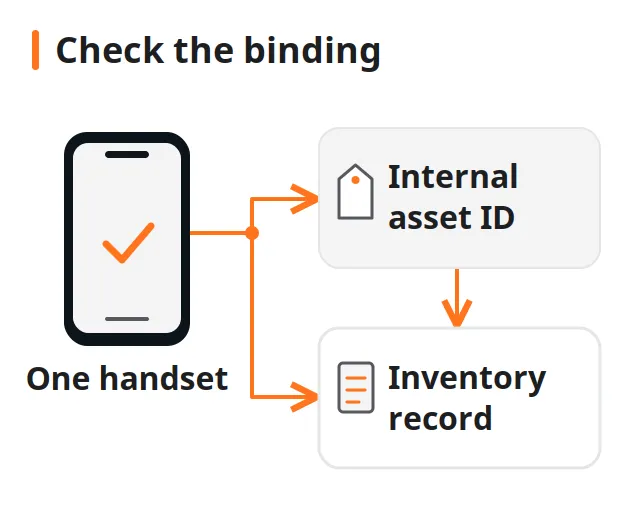
Give each used handset a stable internal asset ID, bind that ID to the available device identifiers, and scan the printed label back into the same record. For PDA integration, verify both barcode delivery to the application and a confirmed inventory-system save. A successful decode alone does not establish the handset's identity or prove that a stock transaction was recorded.
Key takeaways
- Keep the individual asset ID separate from the model SKU, lot number and carton code.
- Choose a barcode format that the actual scanner and receiving application can decode and interpret.
- Treat label printing, identity confirmation and stock release as separate checks.
- Record pending or rejected transactions explicitly; do not treat a scanner beep as a saved movement.
A label attached to the wrong handset sends later inspection results to the wrong record. Build a used-phone asset tagging system around a stable individual ID, a checked device-to-record binding, and a confirmed inventory-system save.
Choose the record model before the barcode hardware. The inputs that change this decision are the seller’s identifier evidence, your existing item records, the label payload, the scanner’s decoding mode and the application’s save response. This guide supplies a suggested field dictionary, label-selection checks and a pilot acceptance matrix for those inputs. Use them to document your own system’s behaviour; no scanner, label material or ERP integration is certified here.
On a phone, swipe the tables horizontally to compare all three columns; keep each item aligned with its purpose and evidence.
| Input or item | Value or source to use | Why it matters |
|---|---|---|
| Individual asset ID | Your inventory system’s allocation rule | Gives the handset a stable record key |
| Device identifier evidence | Available handset identifiers and the seller’s manifest | Supports the physical-to-record match |
| Lot and carton references | Receiving documents and carton tally | Keeps shipment history separate from item identity |
| Barcode format | Actual scanner and application documentation | Establishes whether the label can be decoded and interpreted |
| Label placement | Trial on the intended protective packaging | Checks visibility without obstructing inspection |
| Save confirmation | Your application’s documented transaction response | Distinguishes delivered scan data from a recorded movement |
What should identify one handset?
Use an internal asset ID as the record key for this suggested workflow, and keep available manufacturer or radio identifiers in separate fields. Do not use a shared model SKU or a carton code as an individual handset’s identity. Those references answer different questions: what product it is, where it arrived, and which physical unit is being handled.
Apple’s identifier instructions describe several places to find an iPhone’s serial number or IMEI, including Settings and original packaging. A packaging identifier is evidence to compare with the handset, not a reason to skip the comparison. For other makes, use that manufacturer’s instructions rather than assuming the same locations apply.
| Suggested field | Meaning in this workflow | Recording rule |
|---|---|---|
asset_id |
Internal identity of the physical unit | Allocate once; keep it through ordinary station movements |
device_identifiers |
Available IMEI, serial or other documented identifiers | Store each identifier type and its observed value separately |
identity_evidence |
Where each value was obtained | Distinguish handset display, packaging and manifest |
model_sku |
Product configuration used for grouping | Keep it separate from the individual key |
lot_ref / carton_ref |
Origin of the received item | Record the relationship without using it as the asset key |
identity_status |
Checked, unresolved or disputed association | Leave unresolved items out of automatic stock release |
Before creating a new record, search your managed inventory for existing associations using the available identifier evidence. A returning handset may belong to an existing asset record with a new receiving event. If the same observed identifier points to conflicting records, hold the association for review; do not assume every identifier type is interchangeable or globally unique. Ask the system owner how concurrent stations resolve competing creation attempts.
An unreadable handset can still need a temporary record for receiving. Keep its observed packaging and manifest information as provisional evidence, then confirm the association when your authorized inspection process allows it. Do not fill missing identifiers from a neighbouring unit just to complete the import.
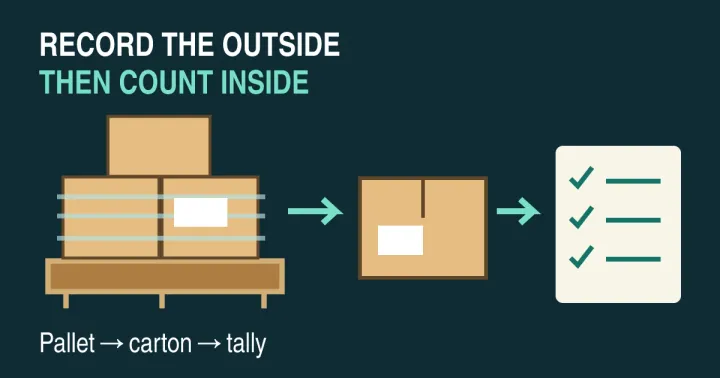
Start with the seller’s model, storage and quantity fields on the lot list. Then use the carton-to-item receiving record to retain the item’s origin. Neither replaces the individual identity check.
Takeaway: Make the individual record key stable, and record how the associated device identifiers were obtained.
Which barcode format fits the receiving task?
Choose a carrier that your actual label generator, scanner and application support. A format name alone does not establish end-to-end compatibility. For an internal handset record, a short asset ID may be enough; an external trading partner’s specification can require a different structure. Test the printed output and the received value together.
The following is a task-based selection table, not a ranking of barcode formats or equipment.
| Candidate | Suggested use to evaluate | Check before choosing |
|---|---|---|
| Code 128 | An internal ID in a linear label | Reader support, usable print area and exact returned text |
| Ordinary Data Matrix | An internal ID in a matrix symbol | Imaging reader support, decoder settings and print quality |
| Ordinary QR Code | An internal ID or an approved record link | Scanner/app support and whether the app treats the payload as text or a link |
| GS1 DataMatrix | An application explicitly requiring GS1 data | Applicable GS1 rules, correct encoding and receiving-system interpretation |
The GS1 DataMatrix guideline distinguishes the carrier from its data structure. GS1 DataMatrix uses FNC1 and GS1 Application Identifiers; an ordinary Data Matrix containing your internal ID does not become GS1 DataMatrix because it looks similar. The guideline also explains why DataMatrix reading requires imaging technology. Check the actual reader rather than assuming every existing barcode scanner will work.
Zebra’s DataWedge Barcode Input documentation lists relevant decoders and scanner configuration. This is a documented example for DataWedge, not a promise about every PDA. Record the handheld, input hardware, software version, enabled decoder and scanning mode used in your own trial.
Common mistake: Selecting a square code for its appearance, then discovering that the receiving application interprets the scanned text differently from the label generator.
Takeaway: Select the carrier and its payload together, then test them with the intended receiving application.
How do you bind the label at intake?
Bind the physical handset, the label and the record before the unit leaves the receiving position. For this proposed procedure, work on the active handset’s record, capture its available identifier evidence, print its asset label, and scan that label back. Release the binding only when the returned ID matches the active record and the save is confirmed.
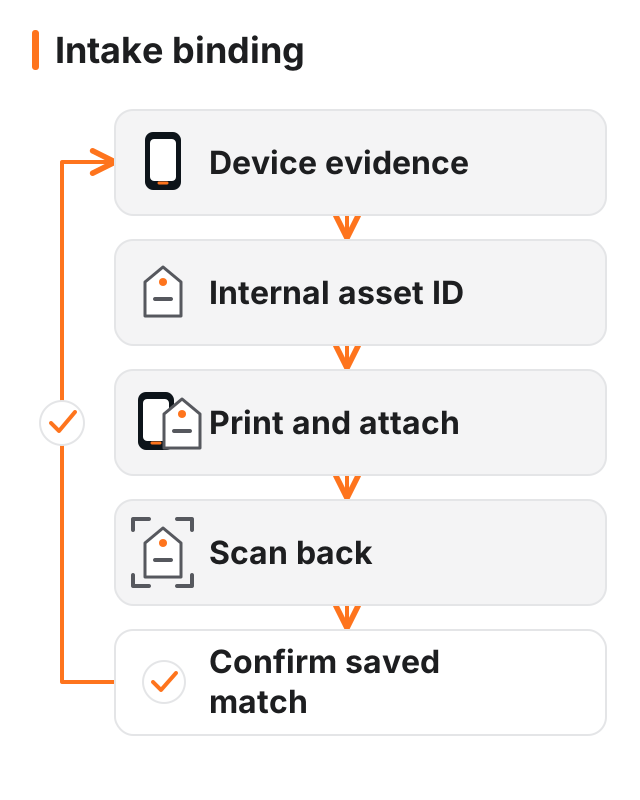
- Select the receiving context. Open the appropriate lot and carton reference. If the shipment itself has not been reconciled, use the pallet receiving and tally protocol first.
- Establish the item’s evidence. Record available device identifiers and their source. Where the handset and manifest disagree, record the disagreement rather than silently replacing either value.
- Allocate the internal ID. Query existing device associations before creating a record, and use the application’s documented allocation and conflict rules. Handle a return as a new event against the verified existing asset where appropriate. Keep creation, lookup and unresolved conflicts visibly different.
- Print and attach the label. Use the active record’s ID. Keep unbound printed labels away from other phones so they cannot be mistaken for completed associations.
- Scan back into the binding check. Compare the decoded ID with the active record, confirm the physical unit still matches its evidence, and obtain the application’s saved result.
The proposed control is to handle the association as a completed operation, not a collection of partially entered fields that look finished. If printing succeeds but the save fails, the handset needs an exception state. Its visible label should not be interpreted as permission to move into ready stock.
Record who completed the binding, the receiving station, the relevant time and the evidence reference. These are suggested audit fields, not claims that a particular product already captures them. Use the intake and diagnostic workflow for the inspections that follow; binding an ID is not a diagnostic pass.
Takeaway: Require a matched scan-back and a saved association before treating the label as a completed item identity.
What belongs on the asset label?
Keep the machine-readable payload tied to stable identity, and keep changing condition information in the record. In this proposed design, the printed label carries the internal ID plus a human-readable copy. Grade, repair status and location belong in recorded events so a change does not require issuing a new identity.
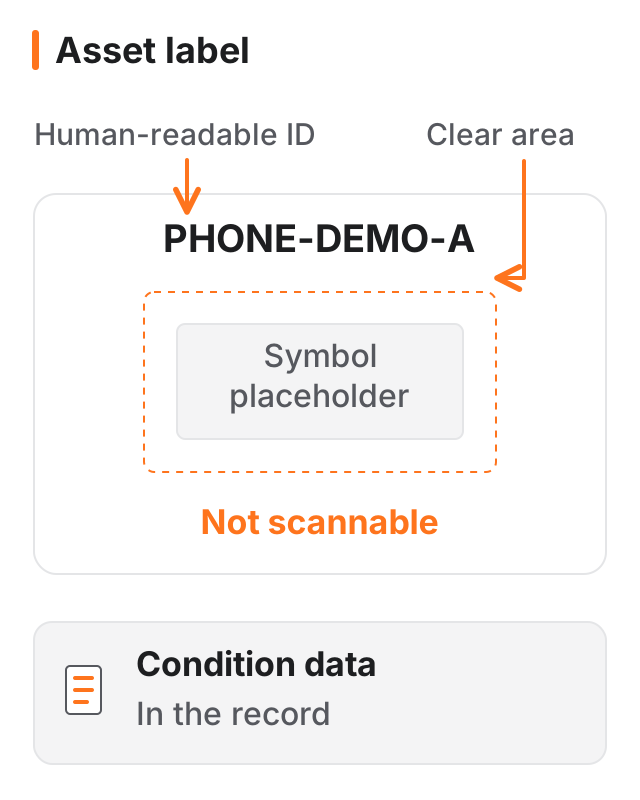
For example, PHONE-DEMO-A is a fictional internal ID used here to discuss the layout. It is not an IMEI, a GS1 identifier or a recommended production numbering scheme. In a real pilot, generate a valid symbol using the actual label software and compare its returned text with the stored ID.
Keep the symbol’s clear area unobstructed, and assess print contrast and legibility using the intended reader. The GS1 guideline discusses symbol quality and verification; this article does not derive a universal label size or a printer setting from it. A decoding test at the bench and any required formal symbol-quality verification are separate checks.
Evaluate placement on the protective sleeve or other packaging used in your process. Check that the code stays with its handset, remains visible at the next station, and does not obstruct screen, camera or port inspection. If a sleeve is removed for testing, specify how the operator preserves the association and checks it again before repacking.
For cosmetic inspection, use the grade definitions and defect descriptions as a separate record. Avoid treating a printed grade as permanent evidence of condition. Where accessories share a carton, keep accessory SKU and compatibility information separate from the handset’s individual label.
Takeaway: Print stable identity clearly; keep condition and movement data in the associated record.
How should a PDA deliver scans to the application?
Choose the input path your application can handle, then define how it acknowledges a saved action. Zebra documents keystroke output and Android Intent output in DataWedge. They describe delivery of acquired data; your inventory application’s validation, permissions and backend transaction remain separate responsibilities to verify with its owner.
| Input path | What the cited implementation supplies | What your pilot still needs to prove |
|---|---|---|
| Keystroke output | Processed data delivered as keyboard input; configured action characters such as TAB or ENTER | Correct field focus, expected text, intended submission and saved result |
| Android Intent output | Data passed programmatically to an application | Correct receiver configuration, parsing, validation and a confirmed inventory write |
In DataWedge Keystroke Output, scan data emulates key presses. Test the actual receiving screen: focus on the intended field, scan the label, and inspect both the value and the resulting action. Include a wrong-field attempt. A suffix configured to advance the cursor is not evidence that the item movement was saved.
In DataWedge Intent Output, the application can receive decoded text and information such as label type through documented intent extras. For example, com.symbol.datawedge.data_string carries barcode characters. The documented label_type describes the barcode symbology, not the business meaning of the label. An item, carton and location can share a symbology. Have the owner define business classification through the agreed payload structure, separate ID namespaces or a record lookup.
This binding procedure assumes one intended item ID is received per scan. Zebra notes that simultaneous multi-barcode acquisition can concatenate data in data_string. Use single-code scanning for this procedure, or document and test the application’s multi-code parsing. Include adjacent labels in the pilot and inspect the received payload; a string arriving is not proof that only the intended label was captured.
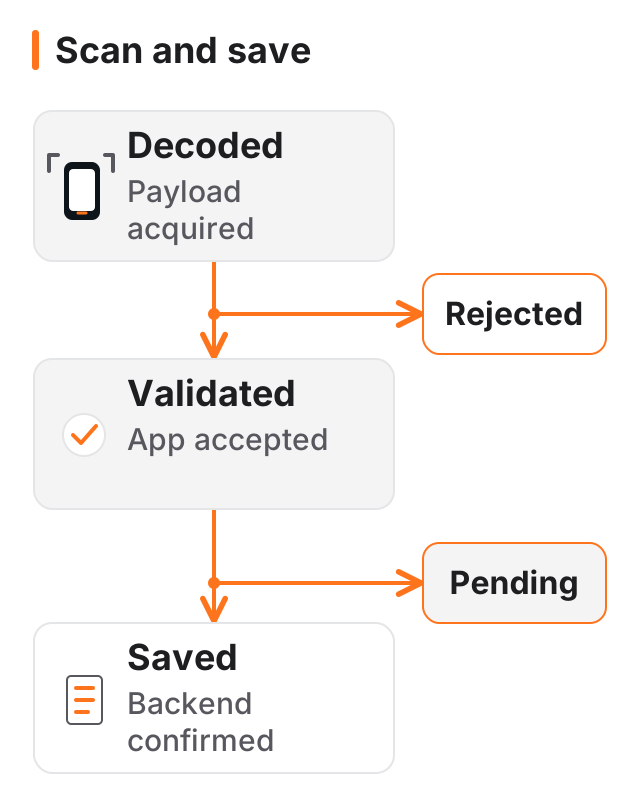
Define visible outcomes for the pilot: decoded means a payload was acquired; validated means the app accepted it for the intended operation; saved means the backend confirmed the write. Use pending for an action awaiting confirmation and rejected for an action the application refused. These are proposed UI terms, not default states promised by the cited software.
For offline operation, document whether your application stops, queues an action or allows a limited local workflow. If it queues events, ask how the same event is recognized on retry and how reconciliation is shown. Distinguish a request that never reached the backend from a write that succeeded but whose confirmation was lost. For the latter, test retrying the original event reference and inspect the resulting stock movement, rather than issuing a new event simply because the screen stayed pending. Do not add received units to an available-stock count solely because a local scan was captured.
Common mistake: Treating the scanner’s decode sound as proof that a receiving or picking transaction reached the inventory system.
Takeaway: Verify the input path and the saved transaction separately, including failure and retry behaviour.
How does the identity survive testing, repair and dispatch?
Reuse the bound asset ID when recording each movement or inspection outcome. Keep the event history distinct from the item’s current status. That lets the proposed record show what changed, which evidence supported the change, and who made it, without encoding the whole history in the physical label.
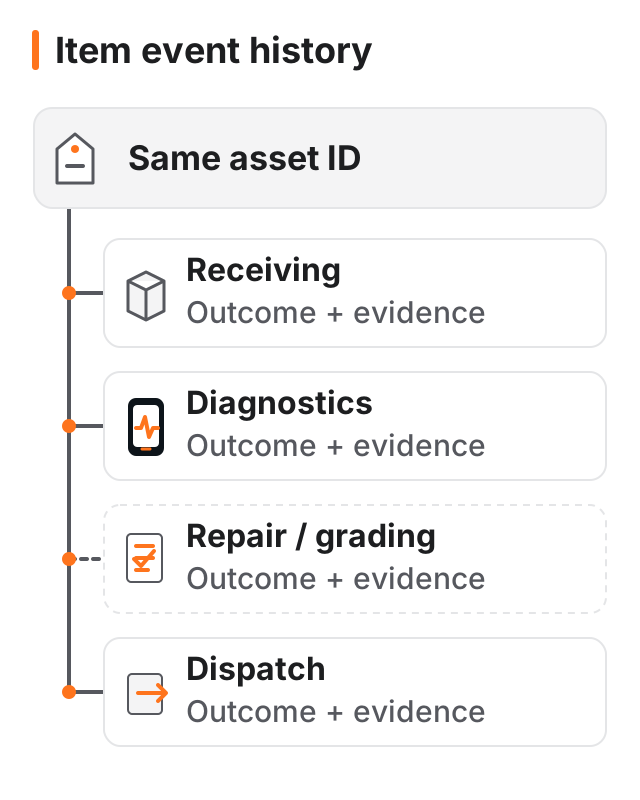
Useful event fields to evaluate include the asset ID, operation, event reference, previous and intended status, station or location, operator, time, evidence reference and save outcome. Ask the system owner how it prevents an older pending event from overwriting a newer confirmed action. Keep both the attempted action and its resolution discoverable.
Separate identity status from functional-test status. A known asset can fail a test; an unidentified handset can produce a test result that is not yet attributable. The diagnostic workflow’s pass, fail and pending records explain why those outcomes belong against the checked unit.
For a worn label, the suggested rule is to verify the handset against the existing record, reprint the same asset ID, record the replacement, and remove and destroy the damaged label copy. Recording a replacement does not itself make the old copy unscannable when both encode the same ID. If your process needs software revocation of individual copies, it needs a separate label-instance or version design and a verified revocation rule; this guide does not assume that capability. If the association is disputed, stop and resolve it rather than making the discrepancy disappear through a new ID. A newly created record is not evidence that the old record was wrong.
At packing, compare the picked item with the intended shipment record and record its destination container. Use the pre-dispatch documentation checks for the shipment context; this identity workflow does not set export or transport requirements.
Takeaway: Preserve identity through ordinary movements and label replacement, while recording changing outcomes as separate events.
What should the pilot acceptance test include?
Test failures as well as ordinary scans before relying on the process for a batch. The acceptance matrix below contains suggested expected behaviour, not measured results or a vendor specification. Record the actual application response, persisted record and exception resolution for each test on your own setup. On a phone, swipe horizontally to read the expected behaviour and evidence alongside each case.
| Pilot case | Suggested expected behaviour | Evidence to retain |
|---|---|---|
| Correct item and active record | Bind and save the intended association | Returned ID, device evidence and saved record |
| Label for a different active item | Refuse completion or require an explicit resolution | Visible mismatch and unchanged item association |
| Carton or location label using the same symbology as the item label | Reject or route by the documented business classification | Received payload, symbology, business classification and app response |
| Existing device association or concurrent creation attempts | Select the verified existing asset or hold the conflicting association; do not create unintended duplicate stock | Device evidence, both station actions and resolved asset records |
| Repeated scan or retried event | Apply the documented duplicate policy without an unintended second movement | Event references and resulting stock record |
| Backend saved but its confirmation was lost | Reconcile or retry the original event with one effective stock movement | Original event reference, client state and backend movement history |
| Older pending event arrives after a newer confirmed event | Apply the documented ordering rule without silently overwriting current stock status | Event order, resulting status and resolution history |
| Loss of connection before confirmation | Display pending or failure according to the documented offline policy | Local state and later backend reconciliation |
| Keystroke scan into the wrong field | Prevent an unintended write, or hold and resolve the exception before acceptance | Before/after saved records, visible error and traceable resolution |
| Adjacent labels in the scanner’s view | Return the intended item ID or invoke the verified multi-code rule | Scanning mode, actual payload and selected record |
| Unreadable or damaged label | Route to a controlled lookup and identity check | Lookup evidence and replacement event |
| Changed sleeve or reprinted label | Preserve the verified unit-to-record relationship; account for the old copy | Physical recheck, old-copy disposal and replacement history |
Choose representative labels and handling situations from the process you intend to run. Include different intended handset configurations, protective packaging and receiving stations where those affect your workflow. Record the selection so a successful trial on one setup is not silently treated as acceptance of another.
Make failure resolution part of acceptance. A test is unfinished if the operator can identify an error but has no defined way to hold the item, correct the association or reconcile the queued action. Conversely, record a field as unavailable when it cannot be obtained; do not transform absence into a pass.
Use the lot-reading checklist to separate a label-system defect from an incomplete seller manifest. The useful output is a signed-off procedure and recorded test evidence for your setup, rather than a claim that barcode tagging eliminates errors.
Takeaway: Accept the workflow only against recorded behaviour, including exceptions and their resolution.
When this does not apply
This guide proposes an internal identity and scanning workflow. It does not establish a GS1 application specification, ownership check, account-lock result, diagnostic pass, data-erasure certificate or transport approval. Where a partner requires a particular identifier scheme, use its applicable specification rather than substituting this suggested internal ID.
- Unresolved identity: keep provisional evidence and a hold state; do not force a handset into a confirmed association.
- Different scanner platform: obtain its own hardware, decoder and application documentation. DataWedge examples do not establish another platform’s capabilities.
- Unsafe or restricted inspection: follow your existing authorized handling process. A binding step is not permission to power, reset or open a device.
- Public record links: evaluate authentication and exposure before printing them. This article does not define your access-control policy.
- Model or application changes: repeat the affected pilot checks when the change alters identifier capture, decoding or transaction behaviour.
Takeaway: Treat identity, system integration, condition and compliance as separate decisions with separate evidence.
Method and sources
This guide combines Apple’s identifier instructions, the GS1 DataMatrix technical guideline and Zebra DataWedge input/output documentation. The DataWedge examples use version 15.0. The GS1 document is Release 2.5.1 from January 2018 and is used for the technical distinctions cited here, not as a substitute for current application rules. Sources were accessed on October 8, 2026.
The field names, binding procedure, application states and acceptance matrix are editorial recommendations. No handset batch, printer, adhesive, scanner or backend was tested for this article. There are no measured speed, cost or error-reduction claims. Source-based guidance follows the site’s editorial policy and fact-checking policy; the content-method disclosure below describes AI assistance.
Takeaway: Use the cited documents to check technical behaviour, and use your own pilot evidence to approve an implementation.
Related reading
- Intake and diagnostics — Keep identity checks separate from lock, function and condition results.
- Pallet receiving and tally — Establish the carton and shipment context before individual binding.
- Used-phone grade descriptions — Define the condition fields that belong in the record rather than in a permanent identity label.
Takeaway: Use the receiving and inspection guides for the decisions that this identity workflow does not establish.
Frequently asked questions
Is there a free barcode inventory system available?
Yes. Snipe-IT’s official pricing page lists its self-hosted option as free, as checked on October 8, 2026. That does not verify this phone workflow or remove hosting and maintenance decisions. Check the current licence, edition, scanner input and duplicate-device handling before treating any free asset system as an accepted inventory solution.
How can I track assets using QR codes?
For the workflow here, encode an internal asset ID or an approved record link, then record movements against the associated handset. If the code opens a link, check that authentication and permissions protect the record. The code should help locate the record; it should not expose a public handset history or silently change stock status.
What is the best barcode scanner app for resellers?
Ask the app provider for an example scan payload, the integration interface and a transaction response your system owner can verify. A scanner demo without a saved receiving record is insufficient for this task. Use the pilot matrix with your own labels; this article has not tested apps and does not establish a best-product ranking.
What is a PDA in a warehouse?
In this guide, PDA means the handheld mobile computer used to run a receiving application and capture barcode data. Specify its scanner input, operating system and application interface when evaluating it. The Zebra documentation cited here describes one implementation; another manufacturer's device needs its own documentation and integration test.
What kind of scanners are used in warehouses?
For this task, consider a workstation reader, a handheld imaging scanner or a supported camera input. For shared stations, add a practical handoff check: confirm that the active application, receiving context and operator are correct after the device changes hands. Reader support alone does not establish that the next operator is scanning into the intended record.
Which ERP system is best for WMS?
This article does not establish a product winner. Ask which system owns item identity, which controls available stock and which returns the authoritative save confirmation. Document who resolves a disagreement between the warehouse screen and ERP record. That responsibility map gives the pilot a clear acceptance owner before anyone selects an integration product.
Sources
- Find the serial number or IMEI on your iPhone, iPad, or iPod touch — Apple Accessed October 8, 2026.
- GS1 DataMatrix Guideline, Release 2.5.1, January 2018 — GS1 Accessed October 8, 2026.
- DataWedge 15.0 Barcode Input — Zebra Technologies Accessed October 8, 2026.
- DataWedge 15.0 Keystroke Output — Zebra Technologies Accessed October 8, 2026.
- Snipe-IT pricing: self-hosted option — Snipe-IT Accessed October 8, 2026.
- DataWedge 15.0 Intent Output — Zebra Technologies Accessed October 8, 2026.