A low cycle count can make a weak battery reading look trustworthy, and a handset can pass intake on a number nobody traced to its source. Cycle count measures how much discharge the battery has accumulated; the health or maximum-capacity percentage estimates how much charge it holds now compared with when it was new. This guide shows where each number is documented, what a mismatch can and cannot tell you, and gives a blank battery record for the phone intake and diagnostic workflow.
A battery cycle count vs health percentage test compares two different readings, so neither can confirm the other. On an iPhone 15 or later with iOS 17.4 or later, both appear under Settings, Battery, Battery Health. On a Pixel 8a or later, cycle count sits under About phone, Battery information, and capacity under Battery health. Apple designs iPhone 15 and later batteries to keep 80% of original capacity at 1,000 complete cycles under ideal conditions (Apple support, December 2025): a design point, not a per-cycle rule. Record each reading with its source, model and OS. If the pair is hard to explain, hold the unit for assessment instead of calling it genuine or tampered.
| Item | What it measures | What it does not establish | Where it is documented |
|---|---|---|---|
| Cycle count | Accumulated discharge equal to 100% of capacity, partial use included | Present capacity, battery originality, or that the counter was never changed | iPhone 15 and later (iOS 17.4+), Pixel 8a and later, Android API 34 extra where the device supplies it |
| Health or maximum capacity % | Estimated capacity now, relative to new | Peak power, runtime in your use, or accuracy on an unverified battery | iPhone Battery Health; Pixel 8a and later Battery capacity |
| Battery level % | Charge left now, as a share of current full capacity | Battery health | Status bar; Android BATTERY_PROPERTY_CAPACITY |
| Parts and Service History label | Apple’s replacement status for the battery | A complete repair history (only the latest service shows) | iPhone XR, XS and later, iOS 15.2+ |
| Peak performance or replacement message | Whether the OS reports reduced peak power or recommends service | The capacity percentage | iPhone Battery Health; Pixel “Reduced” status |
What do cycle count and health percentage each measure?
A charge cycle is complete when the battery has discharged an amount equal to 100% of its capacity, in one go or across several days. The health or maximum-capacity percentage estimates how much charge the battery can hold now, relative to when it was new. One number describes accumulated use; the other describes present condition.
Apple’s example: use 75% of the battery one day, recharge overnight, use 25% the next day, and the two days add up to one cycle. Google counts a Pixel drained from 100% to 50% and recharged as 0.5 cycles. Plugging in a charger does not add a cycle by itself. Apple also says it normalizes a complete cycle between 80% and 100% of original capacity to allow for capacity loss, so the count is a figure the device calculates, not a tally of charger connections.

Apple defines maximum capacity as the battery’s capacity relative to when it was new, and notes that a new phone can show slightly under 100% depending on how long it sat between manufacture and activation. Google’s Pixel Battery health is likewise an estimate of remaining capacity against original capacity, labelled Normal or Reduced (below 80%). Google adds two cautions that matter at intake: the battery’s fuel gauge estimates the capacity, and initial health values come from lab results and may differ from the battery’s actual state.
Peak power is a third property. Apple explains that as a lithium-ion battery chemically ages, its impedance can rise, and impedance also rises temporarily at low charge and in the cold. A battery that cannot supply a sudden power draw can trigger a shutdown even when its capacity reading looks acceptable. Record a shutdown or performance message separately from the capacity figure, and keep both apart from the cosmetic letter, as the guide to how graded used phones are described recommends.
Takeaway: Cycle count records use, the health percentage estimates present capacity, and peak power is a separate observation; record all three separately.
How do a coulomb counter, full-charge capacity and design capacity relate?
In one documented example, a Texas Instruments fuel gauge, the chip counts the charge flowing in and out of the battery (coulomb counting), estimates how much charge a full battery would deliver, and compares that estimate with the design capacity to produce a health figure. The same gauge advances the cycle count as discharge accumulates. On that chip both numbers are calculations, and both depend on how the gauge is configured.
Phone makers in these sources do not say which gauge chip or formula a given model uses. Texas Instruments’ published manual for its bq27546-G1 gauge (SLUUB74, May 2015) shows how one gauge keeps the outputs apart:
| Gauge output | What the TI manual says | What it means for an intake reading |
|---|---|---|
| RemainingCapacity | Predicted charge left, in mAh | Changes minute to minute with use |
| FullChargeCapacity | Compensated estimate of total charge a full battery can deliver at the present load and temperature | Capacity is a prediction, not a weighed quantity |
| StateOfCharge | RemainingCapacity as a percentage of FullChargeCapacity | This is the battery level, not health |
| StateOfHealth | Predicted full-charge capacity at 25°C and a configured load, divided by DesignCapacity | Health depends on assumed conditions as well as wear |
| CycleCount | Adds one when accumulated discharge reaches a configurable threshold (default 900 mAh, “normally about 90% of the Design Capacity”) | What counts as a cycle depends on configuration |

Two consequences follow for anyone comparing the pair. Health on this chip is an estimate tied to temperature and load assumptions, so it can move without any physical change to the cell. The cycle definition depends on a threshold someone set, so a count from one gauge configuration is not guaranteed to mean the same as a count from another. This is one manufacturer’s chip; it explains the mechanism and says nothing about the gauge inside any particular phone.
Android’s public API shows the same split. BATTERY_PROPERTY_CAPACITY returns “remaining battery capacity as an integer percentage of total capacity”, which is the battery level. BATTERY_PROPERTY_CHARGE_COUNTER returns a charge figure in microampere-hours, a snapshot that the reference does not describe as design capacity or health. EXTRA_CYCLE_COUNT, added in API level 34, carries a charging-cycle count when the device supplies one.
Common mistake: Reading the Android battery percentage or a charge-counter snapshot as battery health. A worn battery that has just finished charging still reports 100% charge.
Takeaway: On the documented TI example, health and cycle count are two separate gauge outputs, each calculated under its own assumptions; treat a phone’s pair the same way unless its maker documents otherwise.
Which phones actually show these fields?
Only some model and software combinations document both readings. Record what the device or its documented tools expose, with the exact menu or API name, and enter “not available” for anything missing. An unsupported field is a gap in the evidence; it is not a pass.
| Platform and condition | Health or capacity | Cycle count | Where to look | Notes |
|---|---|---|---|---|
| iPhone 15 and later, iOS 17.4 or later | Battery health and maximum capacity | Yes | Settings, Battery, Battery Health | Also shows manufacture date, first use and whether replacement is recommended |
| iPhone 11 to 14 | Battery health | Not listed for this menu on Apple’s page | Settings, Battery, Battery Health & Charging | Enter “not available from Settings” unless a documented tool supplies it |
| Pixel 8a and later | Normal or Reduced status, plus estimated capacity | Yes | Battery, Battery health, Battery capacity; About phone, Battery information | Health feature not available on Pixel Tablet |
| Pixel 6a, 7, 7 Pro, 7a, 8, 8 Pro | No health status, per Google | Not documented in Google’s guide | Not applicable | Record both as not available |
| Other Android phones | Manufacturer-specific | EXTRA_CYCLE_COUNT on API 34+ if the device supplies it |
Manufacturer’s documentation | getIntProperty errors return 0 (apps targeting below Android 9) or Integer.MIN_VALUE; getLongProperty returns Long.MIN_VALUE if unsupported. The reference gives no error value for EXTRA_CYCLE_COUNT |
Diagnostic suites and apps add a second layer. Record the app or report name, its version, the field name exactly as displayed and its unit. If a tool shows a value that the manufacturer does not document for that model, note the source and that Settings cannot confirm it. Two tools reading the same gauge are not independent confirmation. A 0 or a large negative number does not prove the field is unsupported: Android’s error values depend on the API call and the app’s target SDK, and the reference gives none for the cycle-count extra. Record the value exactly as shown and check the tool’s documentation; enter “not available” only once the tool or manufacturer confirms the field is unsupported or failed to read.
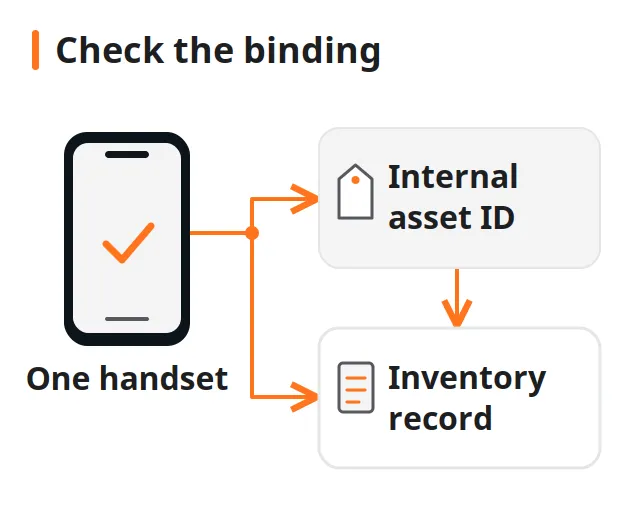
Screenshots and report files only help if they stay attached to the right handset. Bind them to the scanned device identifier using the barcode and asset-tagging workflow before anyone sorts the units.
Takeaway: Note the exact source of every battery value, and leave unsupported fields marked as not available.
Does a cycle count predict the health percentage?
No manufacturer source cited here gives a fixed percentage loss per cycle. Apple and Google publish design references for when a battery should still hold about 80% of its capacity, each with conditions. Use them as context for an unusual pair, not as a formula or an acceptance limit.
| Model group | Manufacturer statement | Conditions | Source |
|---|---|---|---|
| iPhone 14 and earlier | Designed to retain 80% of original capacity at 500 complete charge cycles | Ideal conditions; exact capacity depends on how the phone is used and charged | Apple support, December 5, 2025 |
| iPhone 15 and later | Designed to retain 80% of original capacity at 1,000 complete charge cycles | Same | Apple support, December 5, 2025 |
| Pixel 3 to Pixel 8 Pro, Pixel Fold | Should retain up to 80% capacity for about 800 cycles; replacement recommended after | When charged as recommended | Google Pixel Help, accessed October 11, 2026 |
| Pixel 8a and later | Should retain up to 80% capacity for about 1,000 cycles | Same | Google Pixel Help, accessed October 11, 2026 |
A straight line from 100% to 80% over 500 cycles would be our arithmetic, not Apple’s statement. Apple says the exact capacity depends on use and charging and advises against charging or leaving an iPhone in hot environments for long periods. Google calls capacity an estimate. The TI manual ties full-charge capacity to load and temperature. All three point the same way: capacity loss does not follow the count in fixed steps.
Use the references to decide which pairs need a second look. A health figure that stays very high long after the model’s design point, or a low figure at a low count, deserves a check of the reading’s source, the parts label and the phone’s own messages. If a lot description promises “battery 85%+”, ask which reading, from which source and on which date, using the guide to reading a wholesale phone lot.
Common mistake: Dividing 20 percentage points by 500 cycles and flagging every unit that misses the line. No Apple or Google source states that rule, and applying it turns a design reference into an accusation.
Takeaway: Compare a pair against the model’s design reference to choose units for review, never to pass or fail them.
Can a replaced or altered battery report misleading numbers?
Yes, and the phone’s own labels show when its readings deserve less weight. Apple says that if a battery cannot be verified as genuine, the health information might not be accurate. None of the manufacturer sources here describes a phone-wide way to read a battery’s internal memory and prove its history, so a suspect pair stays unresolved evidence.
On iPhone, Parts and Service History (iOS 15.2 and later, under Settings, General, About) can label the battery:
| Label | Apple’s meaning | How to record it |
|---|---|---|
| Genuine | Repair used genuine Apple parts and processes | Record the label; it does not date the battery or list earlier services |
| Used | Genuine battery previously used in another iPhone (iPhone 15 and later, iOS 18) | Record it; Apple says a reused battery might not perform as well as a new one |
| Finish Repair | New Apple battery installed, Repair Assistant not yet completed | Record it as an incomplete repair |
| Unknown | Not genuine, not working as expected, not verified and linked after repair, or modified or otherwise unverifiable | Record the exact label and give the health figures less weight; the label does not say which cause applies |
Apple shows only the most recent service when a part has been serviced more than once, and which parts appear depends on the model. Before iOS 15.2, the phone can only flag an Unknown part. A missing entry therefore cannot certify an untouched battery.
The search phrase “read battery gas gauge EEPROM” assumes the gauge holds a trustworthy record that a bulk reader can extract. The TI manual gives a narrower picture for its own chip. Cycle count and design capacity sit in the gauge’s data flash; most of those locations are reachable only in an unsealed mode, through evaluation software or block transfers, are set during development and manufacture, and keep whatever value was written. A value read back from that memory shows what the memory holds now. It is not an independent record of past use, and access differs by chip, battery pack and phone. Register addresses, unsealing commands, and data-flash write procedures are specific to each fuel-gauge IC and OEM firmware implementation. If a tool vendor says it reads raw gauge data, ask for model-specific documentation, the supported firmware and OS versions, and what the tool reports when the field is unavailable.
The same discipline applies to other components: the Face ID and fingerprint receiving checks keep repair labels and functional results in separate fields for the same reason.
Takeaway: Record the battery label exactly and treat a suspect pair as unresolved, because no general method here proves which party changed what.
How should you classify a battery reading mismatch?
Classify by the evidence you hold, not by suspicion. Each row pairs an observed situation with what it may indicate, what it does not prove and the next action. None of the outcomes is a fraud finding; that conclusion needs evidence this check cannot produce.
| # | Situation | May indicate | Does not prove | Next action |
|---|---|---|---|---|
| 1 | Both fields read from Settings, within the model’s design reference, label Genuine or no battery service shown | Readings usable as reported | That the battery is new or unrepaired, or how long it will last | Record values, source and date; apply your agreed criterion |
| 2 | A field is not offered for this model or OS | The platform does not expose it | That the battery is fine | Enter “not available”; use only documented tools; do not substitute an estimate |
| 3 | Very high health long past the design point, or low health at a low count | Heat or charging history, a gauge estimate that differs from the cell, a replaced battery, or a changed value | Which of these applies | Retake from Settings, check the parts label and report source; hold if unresolved |
| 4 | Unknown, Used or Finish Repair label | Non-genuine, reused, unlinked or malfunctioning battery, or an unfinished repair | Fraud, or a defective cell | Record the exact label; give health figures less weight; route for assessment under your terms |
| 5 | App or report value differs from Settings | Different field, unit, timing or source | That either value is wrong | Record both with names and times; prefer the manufacturer-documented field |
| 6 | Unexpected shutdowns, a performance message or short runtime with an acceptable capacity figure | Reduced peak power, low charge or cold conditions | That the capacity reading is false | Record the message and conditions as a separate observation; assess |
Where the buyer and seller have agreed a battery criterion, write it into the record and apply it to the readings that the model actually supports. Where none is agreed, say so. An improvised threshold at the bench is harder to defend than a hold with a written reason.
Takeaway: Pick the matching row, record its next action, and leave conclusions about intent out of the intake record.
What should a per-device battery record contain?
Use one row per handset, filled from the device rather than from the lot list. Copy the fields below into your intake sheet. Each one lets a later reviewer see where a reading came from and under what conditions it was taken.
| Field | Example format | Why it matters |
|---|---|---|
| Device identifier | IMEI or serial, scanned from the device | Binds every reading to one handset |
| Model and OS version | As shown in Settings | Decides which battery fields exist |
| Date, time and operator | ISO date, local time, initials | Readings change with time and use |
| Source of each reading | Settings path, or app or report name and version | Separates manufacturer fields from third-party ones |
| Health or maximum capacity | Value and label exactly as shown, or “not available” | Present condition |
| Cycle count | Value as shown, or “not available” | Accumulated use |
| Parts and service label | Genuine, Used, Finish Repair, Unknown, or none shown | Weight given to the health figure |
| Performance or replacement message | Exact text, or “none shown” | Peak power is a separate signal |
| Observation conditions | Battery level, room temperature, charger connected or not | Context for runtime or shutdown notes |
| Original evidence | Screenshot or report file name | Lets a reviewer check the entry |
| Agreed criterion | From your purchase terms, or “none agreed”: ___ | Prevents improvised thresholds |
| Classification | Row number from the mismatch table | Keeps decisions consistent across operators |
| Disposition and reason | Accept, hold or route, with a short note | Leaves an audit trail |
Paste these fields into the battery line of the diagnostic testing checklist in the intake workflow, next to the other functional results. Fill the device identifier by scanning, not typing.
Takeaway: A complete row records the reading, its source, its conditions and the decision, so a later reviewer can check every entry.
When this does not apply
This guide covers reading and recording battery fields on phones that document them. It does not diagnose cells, perform repairs or confirm that a battery is original.
- A swollen, hot or visibly damaged battery is a safety issue, not a reading to record. Stop routine handling and follow the safe-sample handling steps for suspect batteries.
- Laptops and tablets follow different documentation. Apple’s Mac cycle guidance and Google’s Pixel Tablet exclusion do not transfer to phones, or the other way round.
- Android phones other than Pixel use manufacturer-specific menus and tools; take paths and field meanings from that manufacturer’s documentation.
- Shipping phones with batteries is governed by carrier and route rules, covered in the checks before exporting a mixed handset order.
- The sources set no universal acceptance threshold, sample size, tester accuracy or test duration, and this guide does not supply one.
Takeaway: Use the record for documented phone readings only, and switch to safety or manufacturer procedures when the situation falls outside it.
Related reading
Each guide below covers a step that sits next to the battery record in a receiving process.
- Phone intake and diagnostic workflow: place the battery result alongside lock status, functional tests and grading.
- How graded used phones are described: keep the cosmetic letter separate from battery and function records.
- Barcode scanning and asset tagging: keep screenshots and reports bound to the right handset.
- Touch-grid and multi-touch screening: record display-input faults separately from battery observations.
Takeaway: Carry the battery row into the wider intake record without letting it stand in for other checks.
Method and sources
This guide compiles public documentation from Apple, Google, Android Developers, and Texas Instruments into a structured intake recording method and mismatch classification table. Manufacturer pages define the menu paths and design capacity references, while the record fields and classifications structure receiving workflows under your written purchase terms.
Sources were reviewed on October 11, 2026, and are listed below with their original links. The TI manual describes one gauge chip and is used only to explain how a gauge derives capacity, health and cycle figures. The frequently asked questions are Google “People also ask” questions recorded for US English searches such as “battery cycle count vs battery health” in October 2026; they show what readers ask, not how common any battery problem is.
The editorial policy explains how guides separate source facts from suggestions, the fact-checking policy covers corrections, and the AI-use policy describes assistance disclosures.
Last substantive update: October 11, 2026.
Takeaway: Treat this as a public-source recording aid, checked against current manufacturer documentation for the model in front of you.
Frequently asked questions
How many cycles is 1 battery health?
Neither Apple nor Google publishes a per-cycle figure. Apple designs iPhone 14 and earlier batteries to keep 80% of original capacity at 500 complete cycles under ideal conditions and says actual capacity depends on use and charging. Reading that as 1% per 25 cycles is arithmetic, not a manufacturer rule.
Is 300 battery cycles a lot?
It is below every manufacturer design point cited here: 500 complete cycles for iPhone 14 and earlier, 1,000 for iPhone 15 and later, and about 800 or 1,000 for Pixel model groups. The capacity reading and any service message still describe the battery's present condition better than the count does.
How long will a 500 cycle battery last?
It depends on how quickly the phone accumulates cycles. At one full discharge a day, 500 cycles would take about 500 days; lighter use takes longer because partial discharges add up slowly. For iPhone 14 and earlier, Apple's 500-cycle figure marks where the battery is designed to still hold 80%, not the end of its life.
How many battery cycle counts is bad for an iPhone?
Apple names no bad count. It designs batteries to keep 80% of original capacity at 500 complete cycles for iPhone 14 and earlier and 1,000 for iPhone 15 and later, under ideal conditions. On iPhone 15 and later, Battery Health also says whether a replacement is recommended; record that message with the count.
Will my iPhone battery health reset after I replace the battery?
Apple does not promise a particular reading after a replacement. It ties accuracy to verification: if the battery cannot be verified as genuine, the health information might not be accurate. Check Parts and Service History for Genuine, Used, Unknown or Finish Repair and record that label with the new figures.
What to do after replacing an iPhone battery?
On iPhone XR, XS and later, open Settings, General, About and check the battery entry. Apple shows Finish Repair until Repair Assistant completes the repair, Genuine for genuine parts and processes, Used for a previously installed genuine battery on iPhone 15 and later with iOS 18, and Unknown when it cannot verify the part.
How to get back to 100% battery health?
Only replacing the battery restores lost capacity; no setting, reset or app returns an aged cell to 100%, because Apple and Google describe capacity loss as chemical aging of a consumable part. A replacement does not guarantee a 100% reading either: Apple says even a new iPhone can show slightly under 100%, and health information might not be accurate if the battery cannot be verified as genuine.
How do I tell if my phone battery needs replacing?
Start with the phone's own signal. Pixel 8a and later show Reduced below 80% capacity, and Google recommends replacement then or at about 800 or 1,000 cycles depending on model. iPhone 15 and later show whether replacement is recommended, and Apple links unexpected shutdowns to reduced peak power.
Sources
- Batteries: Why Lithium-ion? — Apple Accessed October 11, 2026.
- iPhone battery and performance — Apple Accessed October 11, 2026.
- About the battery and performance of iPhone 11 and later — Apple Accessed October 11, 2026.
- About genuine iPhone batteries — Apple Accessed October 11, 2026.
- iPhone Parts and Service History — Apple Accessed October 11, 2026.
- Understand your Pixel battery — Google Accessed October 11, 2026.
- BatteryManager API reference — Android Developers Accessed October 11, 2026.
- bq27546-G1 Technical Reference Manual (SLUUB74) — Texas Instruments Accessed October 11, 2026.